



Industrial environments demand far more from display equipment than typical commercial or consumer applications. An industrial LCD monitor must operate reliably under harsh conditions such as extreme temperatures, vibration, dust, moisture, and continuous 24/7 usage. Selecting the right industrial LCD monitor is not simply about screen size or resolution—it is about long-term reliability, compatibility, and performance.
This ultimate buyer guide will walk you through the key factors to consider when choosing an industrial LCD monitor, helping you make a well-informed purchasing decision while maximizing operational efficiency and return on investment.
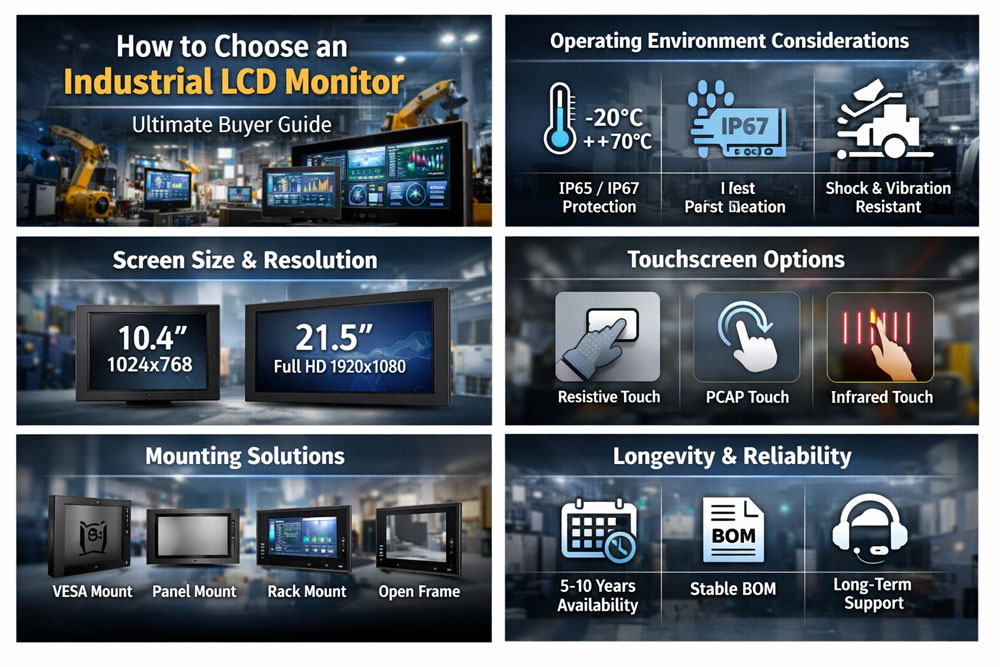
An industrial LCD monitor is a display designed specifically for industrial, commercial, and mission-critical applications. Unlike consumer monitors, industrial LCD displays are built with industrial-grade components, reinforced housings, and extended operating lifecycles.
Common application areas include:
Factory automation and production lines
Human Machine Interface (HMI) systems
Medical and laboratory equipment
Transportation and logistics
Energy, oil & gas, and marine environments
Outdoor kiosks and control rooms
Industrial LCD monitors prioritize durability, stability, and long product availability over aesthetics or entertainment features.
Understanding the installation environment is the first and most critical step when choosing an industrial LCD monitor.
Industrial monitors often need to operate in wide temperature ranges, typically from -20°C to +70°C. For outdoor or factory floor installations, ensure the display supports extended temperature operation without image distortion or component failure.
Look for monitors with IP-rated enclosures:
IP65 for dust-tight and water-resistant front panels
IP67 for wash-down or outdoor environments
Industrial LCD monitors used in transportation, machinery, or mobile applications must comply with vibration and shock standards such as IEC 60068.
Choosing the right display size and resolution depends on viewing distance, workspace layout, and application requirements.
Industrial LCD monitors typically range from 7 inches to 32 inches or larger. Smaller screens are suitable for embedded systems and compact control panels, while larger displays are ideal for monitoring dashboards and control rooms.
Higher resolution ensures clear text and precise visuals:
1024×768 or 1280×800 for basic HMI applications
Full HD (1920×1080) for detailed graphical interfaces
4K UHD for advanced visualization or multi-window displays
Avoid over-specifying resolution, as it may increase cost without real operational benefit.
The type of LCD panel directly affects image quality and usability.
IPS (In-Plane Switching): Wide viewing angles and accurate colors
TN (Twisted Nematic): Faster response times but limited viewing angles
VA (Vertical Alignment): High contrast ratios
For most industrial applications, IPS panels are preferred due to superior visibility from multiple angles.
In industrial settings, operators may view the screen from the side or above. A wide viewing angle (178° horizontal and vertical) ensures consistent image quality.
Brightness is a crucial factor for industrial LCD monitors, especially in high-ambient-light environments.
250–350 nits: Indoor factory or control room use
500–700 nits: Semi-outdoor or brightly lit environments
1000+ nits: Direct sunlight or outdoor applications
Optional features such as anti-glare coatings and optical bonding further improve readability and durability.
Many industrial LCD monitors integrate touchscreen functionality to support intuitive operation.
Resistive Touch: Works with gloves and stylus; ideal for harsh environments
Projected Capacitive (PCAP): Multi-touch support with high clarity
Infrared Touch: Suitable for large screens and public installations
Selecting the correct touch technology depends on environmental conditions, user interaction, and application software compatibility.
Industrial LCD monitors must integrate seamlessly with existing systems.
HDMI
DisplayPort
VGA
DVI
LVDS or eDP for embedded systems
Ensure the monitor supports legacy and modern interfaces to prevent compatibility issues with industrial PCs, PLCs, or embedded controllers.
Proper mounting is essential for space efficiency and ergonomic operation.
VESA mounting (75×75, 100×100)
Panel mount
Rack mount
Open-frame design
Industrial LCD monitors should support multiple installation methods to adapt to different system designs.
One of the biggest differences between industrial and consumer displays is long product lifecycle support.
Industrial LCD monitor manufacturers typically guarantee:
5–10 years of product availability
Stable BOM (Bill of Materials)
Long-term technical support
This is critical for industrial projects where redesign costs are high and system certification must remain unchanged.
Ensure the industrial LCD monitor meets relevant industry standards:
CE, FCC, RoHS
UL or EN safety certifications
Medical or transportation standards if applicable
Compliance ensures safety, reliability, and regulatory approval.
While industrial LCD monitors may have a higher initial cost, they offer a lower total cost of ownership due to:
Reduced downtime
Longer lifespan
Lower maintenance and replacement costs
Avoid choosing based solely on price; focus on long-term value.
Choosing the right industrial LCD monitor requires a clear understanding of application requirements, environmental conditions, and long-term operational goals. By carefully evaluating factors such as durability, display performance, touchscreen technology, connectivity, and lifecycle support, you can select an industrial LCD monitor that delivers reliable performance and long-term value.
A well-chosen industrial LCD monitor is not just a display—it is a critical component of your industrial system’s stability and efficiency.











 IPv6 network supported